
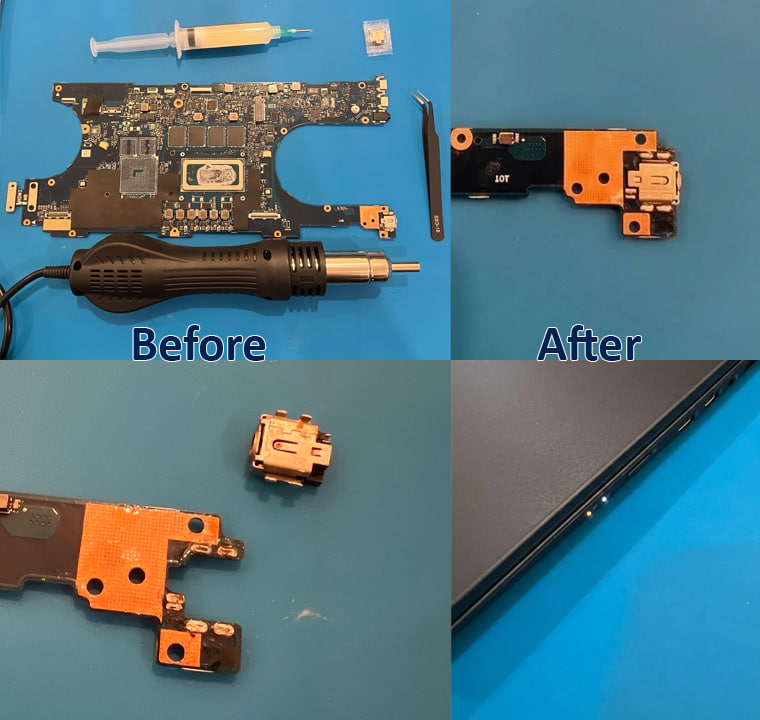
If your laptop only charges when the cable is held at a certain angle, the charge light flickers, or nothing happens at all when you plug in, the problem is often the charging port, not the battery or the charger. A laptop charging port replacement is one of the most common board-level repairs we do for clients in Philadelphia and University City. It usually costs far less than a new laptop.
Below we explain how to tell whether the port is the problem, what to check first, and what the repair involves. The photos come from a real repair on our bench: the worn DC jack was desoldered from the laptop’s charging board with a hot-air rework station, a new jack was soldered in, and the charge light came back on.
Signs your laptop charging port needs replacing
- The charger only works at an angle. You have to wiggle or prop the plug before it charges.
- The plug feels loose or falls out of the port easily.
- The charge light flickers or turns on and off when the laptop is moved.
- The battery drains while plugged in, or Windows shows “plugged in, not charging”.
- The pins are bent or broken, or the plastic around the port is cracked.
- You smell burning or see scorch marks near the port. Stop using the laptop and unplug it.
Check these first: is it really the port?
Before paying for a repair, rule out the cheaper causes:
- Try another charger with the right wattage. Chargers and cables fail more often than ports do.
- Look inside the port with a flashlight. Lint and dust can stop the plug from seating. Clear it gently with a wooden toothpick or compressed air. Don’t use anything metal.
- On USB-C laptops, try a different USB-C port if the laptop has more than one that supports charging.
- Check the battery’s health. A worn-out battery can look like a charging fault. On Windows, run
powercfg /batteryreport. On a Mac, go to System Settings → Battery. - Do a power reset. Shut the laptop down, unplug it, hold the power button for 15–30 seconds, then try charging again.
If none of that helps, and especially if the plug feels loose or only works at an angle, the port is almost certainly the problem.
Why laptop charging ports fail
The charging port, also called the DC jack or power jack, takes physical strain every time you plug in. Common causes:
- Tripping over the cable, or using the laptop with the plug bent sideways
- Years of plugging in and unplugging, which loosens the solder joints that hold the jack to the board
- Dropping the laptop while it’s plugged in
- Using a cheap or wrong charger, which can overheat and burn the contacts
- Liquid spills that corrode the port
How a laptop charging port replacement is done
On most modern laptops the charging port is soldered to the motherboard or to a small separate charging board. It doesn’t just plug in. Replacing it properly takes board-level soldering, not just a screwdriver. Here is how we did the repair in the photos above:
- Diagnosis. We test the charger, battery and power circuit to confirm the jack is the fault and that nothing else on the board is damaged.
- Disassembly. We open the laptop, disconnect the battery and remove the motherboard or charging board.
- Desoldering the old jack. We apply flux and use a hot-air rework station to melt the old solder evenly, then lift the damaged jack off with tweezers so the pads underneath aren’t torn.
- Cleaning the pads. We remove old solder and burnt residue so the new port gets a clean, solid connection.
- Soldering the new port. We fit a matching replacement jack, solder it in and inspect every joint.
- Testing. After reassembly we check that the charge light comes on, the laptop charges under load, and the plug sits firmly with no wiggle.
Some laptops, including many recent Dell, HP and Lenovo models, use a USB-C charging port. Some of those sit on a replaceable daughterboard and others are soldered to the main board. We’ll tell you which type yours has before we start.
Can I replace a laptop charging port myself?
If your laptop’s port is on a separate cable (the “DC jack harness” on some older models), swapping it yourself can be simple. If the port is soldered, a DIY attempt with a basic soldering iron can lift pads, damage nearby components or short the board. That turns a port replacement into a much more expensive motherboard repair. Unless you have hot-air rework experience, it’s cheaper to have it done once and done right.
How much does a laptop charging port replacement cost?
The price depends on whether the port is a plug-in harness, on a separate board, or soldered to the motherboard, and on whether the part is easy to get for your model. A charging port repair usually costs a fraction of the price of a new laptop. See our pricing page or ask us for a free quote. We’ll confirm the cost before any work starts.
Laptop charging port repair in Philadelphia
IT Care Geeks repairs laptop charging ports for Dell, HP, Lenovo, ASUS, Acer, Microsoft Surface and MacBook models. You can drop off your laptop in University City with no appointment needed, book on-site service anywhere in Greater Philadelphia where we come to you, or contact us to describe the problem first. See our full laptop repair service for the other repairs we handle.